

In this article, we will build a project that integrates DeepSeek API with Elasticsearch and Streamlit to create a powerful and interactive search system for the IMDb dataset. The project will
- Index the IMDb dataset into Elasticsearch.
- Use DeepSeek API to generate better search queries.
- Perform searches and display results.
- Provide a user-friendly interface using Streamlit for performing searches and displaying results.
1. Project Structure
imdb-elasticsearch-deepseek/
│
├── app/
│   ├── main.py              # Main application code
│   ├── requirements.txt     # Python dependencies
│.  ├── streamlit_app.py.    # Streamlit code
├── data/
│   ├── top-rated-movies-from-tmdb.csv  # IMDb dataset
│
├── Dockerfile               # Dockerfile for the application
├── docker-compose.yml       # Docker Compose file for the app
├── .env                     # Environment variables
2. Setting Up the Environment
- Install Docker:
- Docker is used to containerize the application and its dependencies.
- Install Docker from here.
2. Download the IMDb Dataset:
- Download the dataset from Kaggle.
- Place it in the
data/folder.
3. Set Up Environment Variables:
- Create a
.envfile with Elasticsearch and DeepSeek credentials.
3: Connecting to Elasticsearch
- The
connect_elasticsearchfunction connects to the Elasticsearch cloud instance using the provided credentials. - It uses the
elasticsearchPython library to interact with Elasticsearch.
4: Indexing Data
- The
create_indexfunction creates an Elasticsearch index with a predefined mapping. - The
index_datafunction indexes the IMDb dataset into Elasticsearch.
5: Integrating DeepSeek API
- The
generate_search_queryfunction uses DeepSeek API to generate better search queries based on user input. - This enhances the search functionality by leveraging DeepSeek’s NLP capabilities.
6: Building the Streamlit Interface
- The
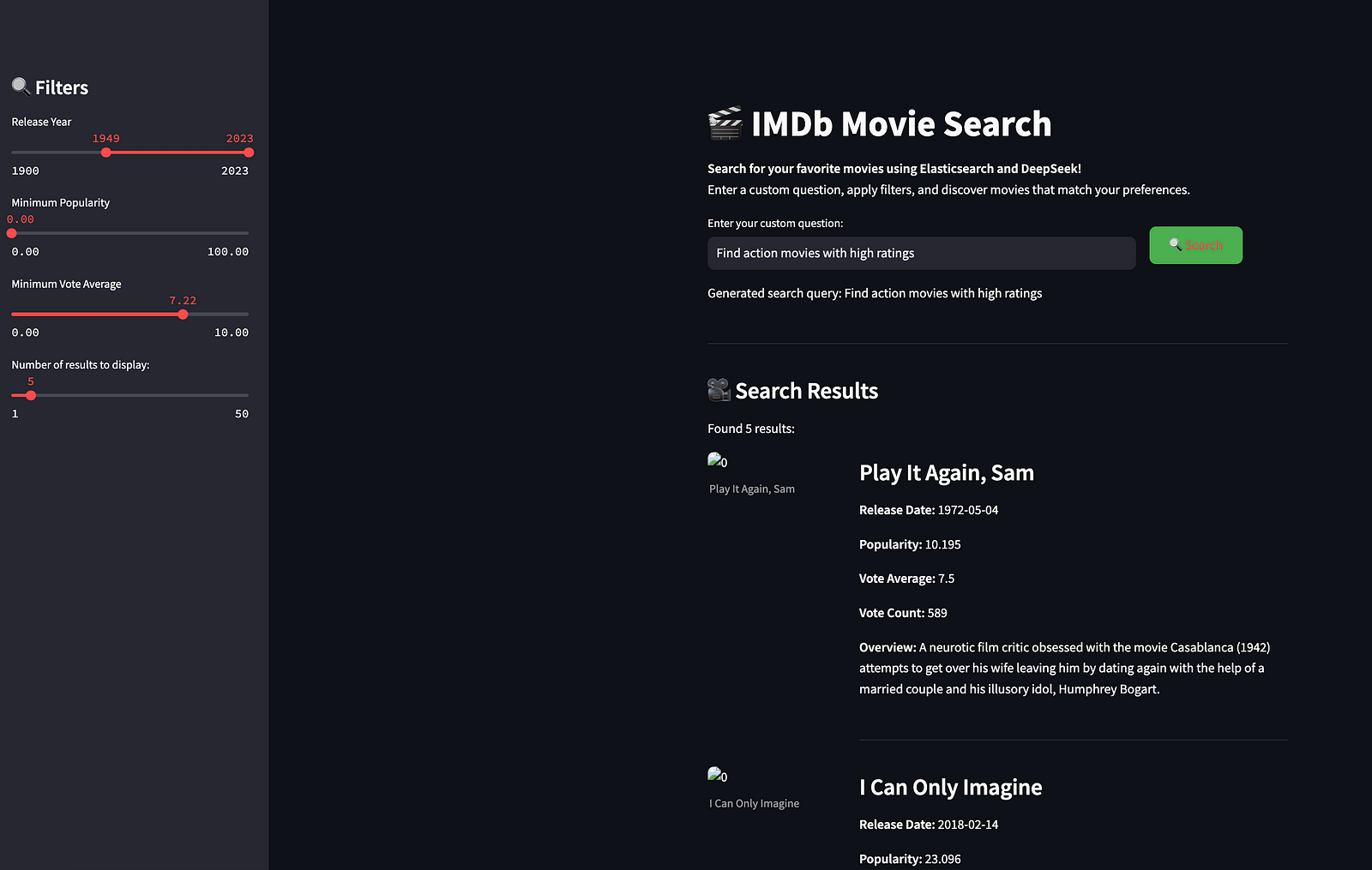
streamlit_app.pyfile provides a user-friendly interface for interacting with the search system. - Users can enter a search query, and the results are displayed in a clean and organized manner.
7: Performing Searches
- The
search_moviesfunction performs a search in Elasticsearch using the generated query. - It displays the search results, including the movie title, overview, release date, and vote average.
8: Deploying with Docker
- The
Dockerfileanddocker-compose.ymlfiles are used to containerize and deploy the application. - Run the project locally using:
docker-compose up --buildAttaching to app-1, streamlit-1
streamlit-1 |
streamlit-1 | Collecting usage statistics. To deactivate, set browser.gatherUsageStats to false.
streamlit-1 |
streamlit-1 |
streamlit-1 | You can now view your Streamlit app in your browser.
streamlit-1 |
streamlit-1 | Local URL: http://localhost:8501
streamlit-1 | Network URL: http://192.168.240.2:8501
streamlit-1 | External URL: http://49.207.209.236:8501
streamlit-1 |
app-1 | Dataset loaded successfully!
app-1 | Connected to Elasticsearch!
app-1 | Index 'imdb_movies' deleted.
app-1 | Index 'imdb_movies' created.
app-1 | Total rows to index: 9859
app-1 | Indexed 100/9859 rows...
app-1 | Indexed 200/9859 rows...
app-1 | Indexed 300/9859 rows...
app-1 | Indexed 400/9859 rows...
app-1 | Indexed 500/9859 rows...
app-1 | Indexed 600/9859 rows...
app-1 | Indexed 700/9859 rows...
app-1 | Indexed 800/9859 rows...
app-1 | Indexed 900/9859 rows...
app-1 | Indexed 1000/9859 rows...
app-1 | Indexed 1100/9859 rows...
app-1 | Indexed 1200/9859 rows...
app-1 | Indexed 1300/9859 rows...
app-1 | Indexed 1400/9859 rows...
app-1 | Indexed 1500/9859 rows...
app-1 | Indexed 1600/9859 rows...
app-1 | Indexed 1700/9859 rows...
app-1 | Indexed 1800/9859 rows...
app-1 | Indexed 1900/9859 rows...
app-1 | Indexed 2000/9859 rows...
app-1 | Indexed 2100/9859 rows...
app-1 | Indexed 2200/9859 rows...
app-1 | Indexed 2300/9859 rows...
app-1 | Indexed 2400/9859 rows...
app-1 | Indexed 2500/9859 rows...
app-1 | Indexed 2600/9859 rows...
app-1 | Indexed 2700/9859 rows...
app-1 | Indexed 2800/9859 rows...
app-1 | Indexed 2900/9859 rows...
app-1 | Indexed 3000/9859 rows...
app-1 | Indexed 3100/9859 rows...
app-1 | Indexed 3200/9859 rows...
app-1 | Indexed 3300/9859 rows...
app-1 | Indexed 3400/9859 rows...
app-1 | Indexed 3500/9859 rows...
app-1 | Indexed 3600/9859 rows...
app-1 | Indexed 3700/9859 rows...
app-1 | Indexed 3800/9859 rows...
app-1 | Indexed 3900/9859 rows...
app-1 | Indexed 4000/9859 rows...
app-1 | Indexed 4100/9859 rows...
app-1 | Indexed 4200/9859 rows...
app-1 | Indexed 4300/9859 rows...
app-1 | Indexed 4400/9859 rows...
app-1 | Indexed 4500/9859 rows...
app-1 | Indexed 4600/9859 rows...
app-1 | Indexed 4700/9859 rows...
app-1 | Indexed 4800/9859 rows...
app-1 | Indexed 4900/9859 rows...
app-1 | Indexed 5000/9859 rows...
app-1 | Indexed 5100/9859 rows...
app-1 | Indexed 5200/9859 rows...
app-1 | Indexed 5300/9859 rows...
app-1 | Indexed 5400/9859 rows...
app-1 | Indexed 5500/9859 rows...
app-1 | Indexed 5600/9859 rows...
app-1 | Indexed 5700/9859 rows...
app-1 | Indexed 5800/9859 rows...
app-1 | Indexed 5900/9859 rows...
app-1 | Indexed 6000/9859 rows...
app-1 | Indexed 6100/9859 rows...
app-1 | Indexed 6200/9859 rows...
app-1 | Indexed 6300/9859 rows...
app-1 | Indexed 6400/9859 rows...
app-1 | Indexed 6500/9859 rows...
app-1 | Indexed 6600/9859 rows...
app-1 | Indexed 6700/9859 rows...
app-1 | Indexed 6800/9859 rows...
app-1 | Indexed 6900/9859 rows...
app-1 | Indexed 7000/9859 rows...
app-1 | Indexed 7100/9859 rows...
app-1 | Indexed 7200/9859 rows...
app-1 | Indexed 7300/9859 rows...
app-1 | Indexed 7400/9859 rows...
app-1 | Indexed 7500/9859 rows...
app-1 | Indexed 7600/9859 rows...
app-1 | Indexed 7700/9859 rows...
app-1 | Indexed 7800/9859 rows...
app-1 | Indexed 7900/9859 rows...
app-1 | Indexed 8000/9859 rows...
app-1 | Indexed 8100/9859 rows...
app-1 | Indexed 8200/9859 rows...
app-1 | Indexed 8300/9859 rows...
app-1 | Indexed 8400/9859 rows...
app-1 | Indexed 8500/9859 rows...
app-1 | Indexed 8600/9859 rows...
app-1 | Indexed 8700/9859 rows...
app-1 | Indexed 8800/9859 rows...
app-1 | Indexed 8900/9859 rows...
app-1 | Indexed 9000/9859 rows...
app-1 | Indexed 9100/9859 rows...
app-1 | Indexed 9200/9859 rows...
app-1 | Indexed 9300/9859 rows...
app-1 | Indexed 9400/9859 rows...
app-1 | Indexed 9500/9859 rows...
app-1 | Indexed 9600/9859 rows...
app-1 | Indexed 9700/9859 rows...
app-1 | Indexed 9800/9859 rows...
app-1 | Indexed 9859/9859 rows...
app-1 | Data indexed successfully!
app-1 | Found 20 results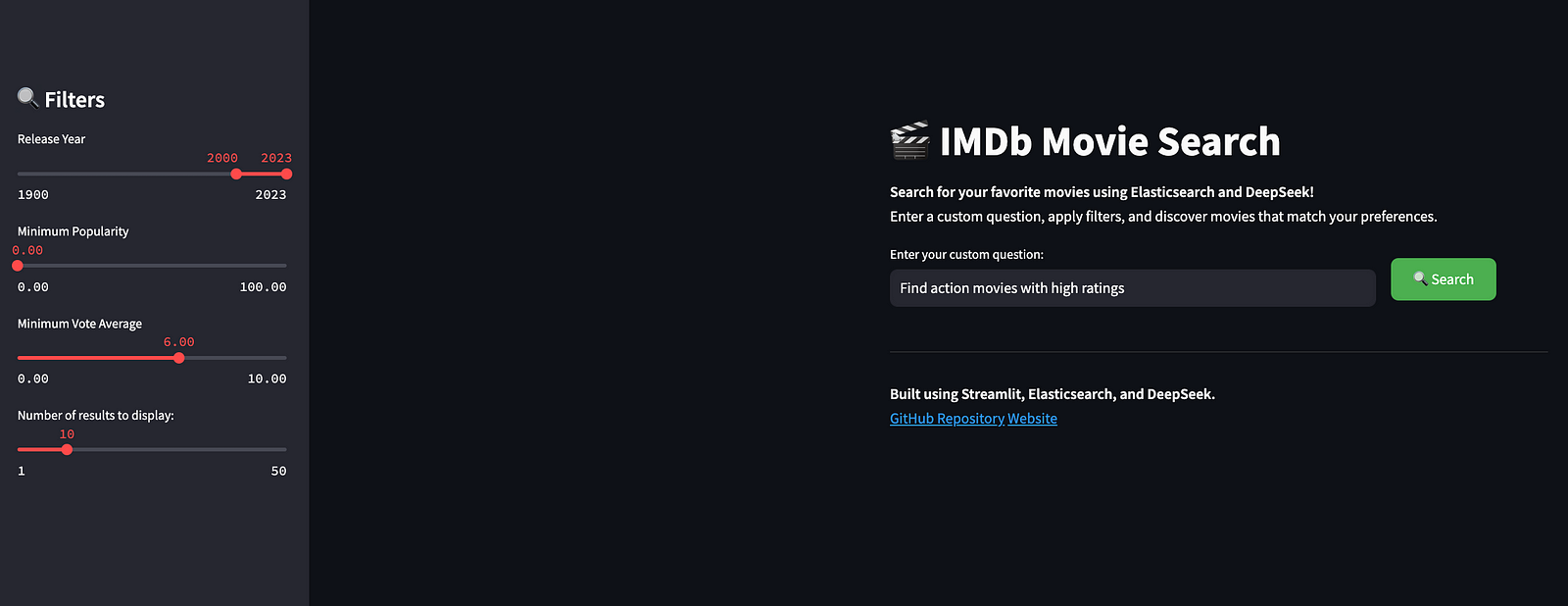

Future Enhancements
- Advanced Search Filters:
- Add more search filters.
2. User Authentication:
- Implement user authentication to restrict access to the application.
3. Scalability:
- Use Kubernetes to deploy the application in a scalable and resilient manner.
4. Data Visualization:
- Add visualizations (e.g., charts and graphs) to display trends in the IMDb dataset.
5. Real-Time Updates:
- Implement real-time updates to the dataset and search results using WebSockets.
The project code is available on GitHub.
Conclusion
This project showcases the integration of the DeepSeek API with Elasticsearch and Streamlit to create a powerful and interactive search system. By utilizing DeepSeek’s natural language processing (NLP) capabilities along with Streamlit’s user-friendly interface, we can deliver a seamless search experience. Additionally, the project is containerized using Docker, which simplifies deployment and scaling.
Related Articles:
How to Install DeepSeek Locally and Run It with Ollama or Any Other Model
How to Get Your DeepSeek API Key: Testing and Troubleshooting
DeepSeek AI vs Other AI Models like GPT: Strengths and Limitations




 Tech Insights & Blogs by Rahul Ranjan
Leave a comment