


In today’s complex and distributed software ecosystems, observability ensures reliability, performance, and efficiency. Traditional monitoring techniques are being replaced by a more comprehensive approach: observability, which encompasses logs, metrics, and traces. One of the key facilitators of this modern observability practice is OpenTelemetry, with its core being the OpenTelemetry Collector.
In this article, we will delve into the OpenTelemetry Collector, exploring its workings, architecture, its benefits for modern observability, and why it is superior to direct application instrumentation. We will also cover how to configure the collector and examine its real-world applications.
What is the OpenTelemetry Collector?
The OpenTelemetry Collector is a powerful, vendor-agnostic service designed to receive, process, and export telemetry data (logs, metrics, and traces) to one or more monitoring backends. It decouples your telemetry data pipeline from the specific backend you’re using, allowing for seamless data collection and export.
This allows organizations to centralize telemetry management, reduce the overhead on individual services, and streamline data collection from multiple sources.
What is the OpenTelemetry Collector?
The OpenTelemetry Collector is a powerful, vendor-agnostic service designed to receive, process, and export telemetry data (logs, metrics, and traces) to one or more monitoring backends. It decouples your telemetry data pipeline from the specific backend you’re using, allowing for seamless data collection and export.
This allows organizations to centralize telemetry management, reduce the overhead on individual services, and streamline data collection from multiple sources.
Why Use the OpenTelemetry Collector?
Let’s understand why the OpenTelemetry Collector stands out compared to directly instrumenting applications.
- Decoupling from Backend Services: By using the collector, there is no need to instrument your applications for every telemetry backend (e.g., Prometheus, Elasticsearch, Jaeger). This keeps the instrumentation lightweight and prevents application code from being tightly coupled with the observability backend.
- Reduced Resource Consumption: Sending telemetry data directly from applications can add overhead. The collector acts as a middleware, batching, and processing data, thus reducing the pressure on your services.
- Flexible Export Configuration: With the OpenTelemetry Collector, you can export telemetry data to multiple backends simultaneously. For example, you can send metrics to Prometheus, traces to Jaeger, and logs to Elasticsearch, all from the same telemetry stream.
- Centralized Management:It enables centralized configuration and control of telemetry data, making it easier to scale your observability setup in environments with multiple services, especially microservices.
- Better Performance: With its built-in features such as batching, retry mechanisms, and resource limits, the collector ensures efficient transmission of telemetry data, reducing the risk of data loss during high-load periods.
OpenTelemetry Collector Architecture
The OpenTelemetry Collector’s architecture consists of four key components: Receivers, Processors, Exporters, and Extensions. Understanding these components will help you comprehend how the collector functions.
1. Receivers
Receivers are responsible for receiving telemetry data from instrumented applications. Each receiver supports one or more data formats (protocols). Examples include:
OTLP Receiver: The OpenTelemetry Protocol (OTLP) is used for receiving telemetry data in the native OpenTelemetry format. Both HTTP and gRPC protocols are supported.
- Jaeger Receiver: Receives trace data from Jaeger-instrumented applications.
- Prometheus Receiver: Scrapes Prometheus metrics from instrumented services.
receivers:
  otlp:
    protocols:
      grpc:
        endpoint: "0.0.0.0:4317"
      http:
        endpoint: "0.0.0.0:55681"
  prometheus:
    config:
      scrape_configs:
        - job_name: 'my-service'
          static_configs:
            - targets: ['localhost:8080']
In this example, the OTLP receiver is configured to accept both gRPC and HTTP requests, while the Prometheus receiver is configured to scrape metrics from an application running on localhost:8080.
2. Processors
Processors handle the telemetry data after it’s received but before it is exported. This stage is crucial for modifying, enriching, or optimizing the telemetry data. Common processors include:
- Batch Processor: Groups multiple telemetry data points for more efficient transmission.
- Memory Limiter Processor: Prevents the collector from exceeding a predefined memory limit by dropping data if necessary.
- Attributes Processor: Adds, modifies, or removes attributes from telemetry data.
Example Processor Configuration:
processors:
  batch:
    send_batch_size: 1024
    timeout: 10s
  memory_limiter:
    check_interval: 5s
    limit_mib: 500
    spike_limit_mib: 250
In this configuration, the batch processor groups telemetry data into chunks of 1024 items and sends them every 10 seconds. The memory limiter ensures that the collector does not exceed 500 MiB of memory.
3. Exporters
Exporters are responsible for sending the processed telemetry data to one or more backends for storage and visualization. Examples include:
- Jaeger Exporter: Sends trace data to Jaeger for visualizing distributed traces.
- Prometheus Exporter: Exposes metrics for Prometheus to scrape.
- Elastic Exporter: Sends logs and traces to Elasticsearch.
Example Exporter Configuration:
exporters:
  otlp/elastic:
    # !!! Elastic APM https endpoint WITHOUT the "https://" prefix
    endpoint: "elastic.apm.us-central1.gcp.cloud.es.io:443"
    compression: none
    headers:
      Authorization: "Bearer <secret token>"
This configuration sends trace data to an elastic search cluster at a specified endpoint.
4. Extensions
Extensions provide additional functionality to the collector, such as health monitoring, authentication, or performance profiling. These are not directly involved in telemetry data processing but enhance the functionality of the collector.
For example, you can use a health check extension to expose the health status of the collector service.
Example Extension Configuration:
extensions:
  health_check:
    endpoint: "0.0.0.0:13133"
This extension exposes a health endpoint, which can be used to monitor the status of the collector.
Pipelines: Bringing it All Together
Pipelines in OpenTelemetry define the flow of telemetry data from receivers, through processors, and finally to exporters. You can define different pipelines for different types of telemetry data (e.g., one for traces, one for metrics, one for traces).
Example Pipeline Configuration:
service:
  pipelines:
    traces:
      receivers: [otlp]
      processors: [batch]
      exporters: [otlp/elastic]
    metrics:
      receivers: [otlp]
      processors: [batch]
      exporters: [otlp/elastic]
    logs:
      receivers: [otlp]
      processors: [batch]
      exporters: [otlp/elastic]
In this configuration:
- A traces pipeline collects trace data via OTLP, processes it through batch processors, and sends it to elastic.
- A metrics pipeline collects oltp metrics, batches them, and sends them to Elastic.
- A log pipeline collects oltp metrics, batches them, and sends them to Elastic.
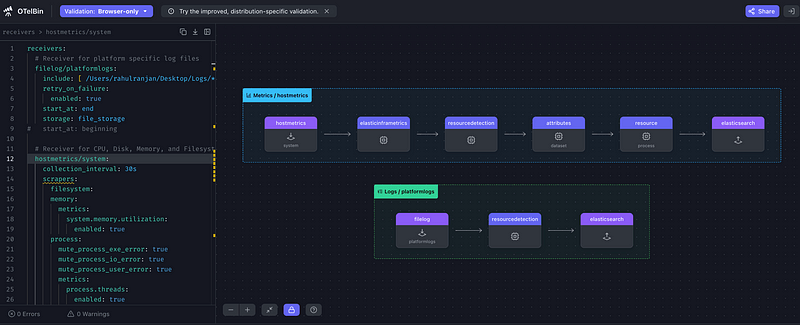
If you want to play around with OpenTelemetry config and visualize it in a tool, you can try https://www.otelbin.io/, which displays a nice view.
Configuration Parameters Explained
The OpenTelemetry Collector’s configuration is built on YAML files. Let’s break down some of the key parameters:
- Receivers: Define how the collector receives telemetry data. Supported protocols include OTLP, Jaeger, Prometheus, Zipkin, etc.
- Processors: Modify and optimize telemetry data before it’s exported. Includes processors for batching, memory limiting, attribute manipulation, and retry logic.
- Exporters: Specify where the telemetry data will be sent (e.g., Jaeger, Prometheus, Datadog, Elasticsearch, etc.).
- Extensions: Add-on features for the collector, such as health checks, authentication, or profiling tools.
- Pipelines: Define how telemetry data flows through the collector, combining receivers, processors, and exporters into distinct workflows for traces, metrics, and logs.
Why the OpenTelemetry Collector is Better Than Direct Instrumentation
1. Separation of Concerns:
In a traditional setup, you would have to install multiple agents or SDKs for each observability backend in each application. This can result in code and configuration that are closely connected. With the collector, applications only need to be instrumented once (for example, using OpenTelemetry SDKs), and the collector handles sending data to the chosen backends.
2. Reduced Overhead on Applications:
When instrumenting an application directly, the application must handle batching, retrying, and exporting telemetry. This can lead to performance issues, particularly under heavy loads. The OpenTelemetry Collector relieves the application of this responsibility, enabling it to concentrate on its core functions.
3. Unified Observability:
The collector gathers telemetry data from different services and protocols, and then organizes it in a central location before sending it to various backends. This makes it possible to establish observability across a broad array of services, frameworks, and languages without needing to handle separate instrumentation methods for each one.
4. Flexibility in Backends:
The collector enables you to switch or use multiple backends without having to modify your application code. For instance, if your company decides to migrate from Prometheus to Datadog or Elastic, you only need to change the exporter in the collector, rather than modifying your services.
Real-World Use Cases
- Microservices Architecture: Consider an e-commerce platform with numerous microservices, all producing metrics, traces, and logs. Rather than having to set up individual agents for Prometheus, Jaeger, and Elasticsearch for each service, you can streamline the process by using the OpenTelemetry Collector to gather all telemetry data in one place. This approach simplifies development and maintenance, while also cutting down on resource usage across the services.
- Cloud-Native Environments: In a Kubernetes-based environment, you can deploy the OpenTelemetry Collector as a sidecar or DaemonSet to collect telemetry data from pods, process it, and export it to multiple observability platforms like Prometheus for metrics and Jaeger for traces.
- Multi-Cloud Observability: If your applications are deployed across multiple cloud environments (AWS, Azure, GCP), the OpenTelemetry Collector can serve as a bridge to unify telemetry data from various cloud services and export it to a centralized observability platform.
Conclusion
The OpenTelemetry Collector is a powerful and versatile tool for centralizing observability data collection, processing, and export. By abstracting away the complexities of backend integration, it enables more scalable, flexible, and efficient observability setups. Whether you’re running microservices, deploying in the cloud, or supporting multi-cloud architectures, the OpenTelemetry Collector offers a modern solution for managing telemetry data.
In short, the OpenTelemetry Collector simplifies observability, making it more efficient and flexible for teams optimizing their monitoring and tracing practices.
Related Article:
OpenTelemetry with Elastic Observability
Elastic RUM (Real User Monitoring) with Open Telemetry (OTel).
OpenTelemetry: Automatic vs. Manual Instrumentation — Which One Should You Use?
Configuration of the Elastic Distribution of OpenTelemetry Collector (EDOT)
Test and Analyze OpenTelemetry Collector processing
#otel #docker #kubernetes #devops #elasticsearch #observability #search #apm #APM #grafana #datadog #
Feel Free to Reach Out at Linkedin:




 Tech Insights & Blogs by Rahul Ranjan
Leave a comment