

The OpenTelemetry Collector receives traces, metrics, and logs, processes the telemetry, and exports it to a wide variety of observability backends using its components.
This article explains how to quickly set up and run the OpenTelemetry Collector and then send telemetry data using telemetrygen and analyze how it is processed by the Collector.
Prerequisites
Set up the environment
- Pull in the OpenTelemetry Collector Docker image
docker pull otel/opentelemetry-collector:0.107.0
2. Install the telemetrygen utility using Go.
go install github.com/open-telemetry/opentelemetry-collector-contrib/cmd/telemetrygen@latest
telemetrygen can simulate a client generating traces, metrics, and logs.
3. Generate and collect telemetry by launching the collector:
docker run \
  -p 127.0.0.1:4317:4317 \
  -p 127.0.0.1:55679:55679 \
  otel/opentelemetry-collector:0.107.0 \
  2>&1 | tee collector-output.txt
collector-output.txt will have generated log for playing around later with data.
4. Generate sample traces via the telemetrygen tool.
/Users/rahulranjan/go/bin/telemetrygen traces --otlp-insecure \
  --traces 10 2>&1 | grep -E 'start|traces|stop'
Output
2024-08-19T18:20:15.426+0530    INFO    traces/traces.go:52     starting gRPC exporter
2024-08-19T18:20:15.430+0530    INFO    traces/traces.go:114    generation of traces isn't being throttled
2024-08-19T18:20:15.432+0530    INFO    traces/worker.go:112    traces generated        {"worker": 0, "traces": 10}
2024-08-19T18:20:15.432+0530    INFO    traces/traces.go:74     stop the batch span processor
2024-08-19T18:20:15.487+0530    INFO    traces/traces.go:64     stopping the exporter
5. Grep the collector-output.txt to view the generated traces.
grep -E '^Span|(ID|Name|Kind|time|Status \w+)\s+:' ./collector-output.txt
Output:
Span #0
    Trace ID       : 98449b4040958e4252c58649425f58fa
    Parent ID      : 5bea0ffce26ca257
    ID             : 82409fbb94f14b62
    Name           : okey-dokey-0
    Kind           : Server
    Start time     : 2024-08-19 12:50:15.431533 +0000 UTC
    End time       : 2024-08-19 12:50:15.431656 +0000 UTC
    Status code    : Unset
    Status message :
Span #1
    Trace ID       : 98449b4040958e4252c58649425f58fa
    Parent ID      :
    ID             : 5bea0ffce26ca257
    Name           : lets-go
    Kind           : Client
    Start time     : 2024-08-19 12:50:15.431533 +0000 UTC
    End time       : 2024-08-19 12:50:15.431656 +0000 UTC
    Status code    : Unset
    Status message :
Span #2
    Trace ID       : 855d99dc14df62b3ebdb03015e291b39
    Parent ID      : d47ad5cff37c361c
    ID             : d9e97216bfafed7f
    Name           : okey-dokey-0
    Kind           : Server
    Start time     : 2024-08-19 12:50:15.432111 +0000 UTC
    End time       : 2024-08-19 12:50:15.432234 +0000 UTC
    Status code    : Unset
    Status message :
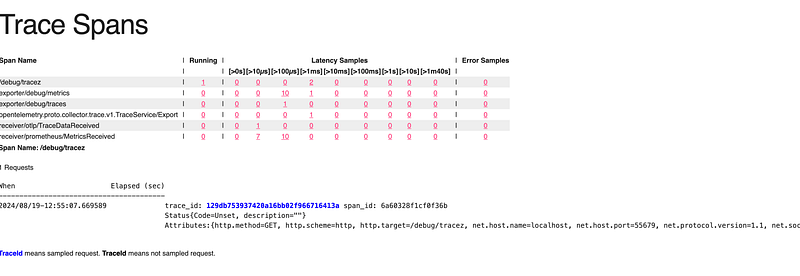
6. Navigate to http://localhost:55679/debug/tracez to analyze the traces generated above.
References
https://opentelemetry.io/https://opentelemetry.io/
OpenTelemetry with Elastic Observability
#otel #docker #kubernetes #devops #elasticsearch #observability #search #apm
Related Article:
OpenTelemetry with Elastic Observability
Elastic RUM (Real User Monitoring) with Open Telemetry (OTel).
OpenTelemetry: Automatic vs. Manual Instrumentation — Which One Should You Use?
Configuration of the Elastic Distribution of OpenTelemetry Collector (EDOT)




 Tech Insights & Blogs by Rahul Ranjan
Leave a comment