


In this guide, we will explain how to set up a Dockerized news aggregator. This aggregator will retrieve data from an external API, store it in Elasticsearch, and display it using a Flask UI. Additionally, we will integrate our application with Elastic APM for performance monitoring and gather RUM (Real User Monitoring) data from the front-end application.
Prerequisites
- Docker and Docker Compose are installed on your machine.
- Elastic Cloud account (or a local Elasticsearch instance).
- API Key for the news data source (e.g., NewsAPI).
- Basic knowledge of Python and Flask
Project Overview
This project revolves around a dual-service architecture, powered by Docker containers:
- News Aggregation Service:
- Flask UI Service:
Real User Monitoring (RUM) Integration
To capture real-time data on how users interact with the UI, I integrated Elastic’s RUM agent into the index.html file of the Flask service. The RUM agent collects critical data such as page load times, user interactions, and any client-side errors, providing a comprehensive view of the end-user experience.
This integration allows me to optimize the UI continuously, ensuring that any issues affecting the user experience are identified and resolved quickly.
Project Structure
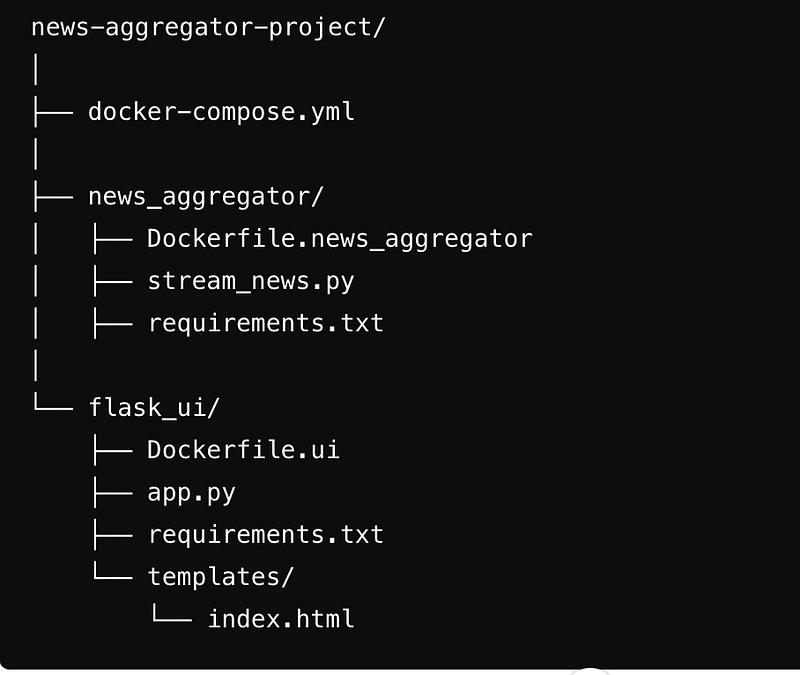
Step-by-Step Guide to Building the Project
Step 1: Set Up Elasticsearch on Elastic Cloud
- Sign Up: Begin by signing up for an account on Elastic Cloud.
- Create Deployment: Create a new Elasticsearch deployment. This will provide you with a cluster where all news articles will be indexed and stored.
- Get Credentials: Note down the cloud ID, username, and password for your deployment. These credentials will be needed later to connect your services.
Step 2: Develop the News Aggregation Service
In the backend, we implement the logic to fetch news from an external API, process the data, and index it into Elasticsearch. We use a specific library to fetch data and interact with Elasticsearch. Additionally, the backend is instrumented with Elastic APM to capture performance metrics.
Step 3: Develop the Flask UI Service
The Flask UI is a straightforward web application that retrieves news articles from Elasticsearch and presents them on a web page. We utilize Flask’s templating engine to generate the HTML and CSS for the frontend. Additionally, Elastic APM is integrated into the Flask app to monitor frontend performance.
Step 4: Integrate Real User Monitoring (RUM)
- RUM Agent Setup: Added the RUM agent script to the index.html file to capture real-time user interactions. Update the actual value for serviceName, serverUrl and secretToken.
<!-- Elastic APM RUM Agent Configuration -->
    <script>
        function handleScriptError() {
            console.error('Failed to load Elastic APM RUM agent script.');
        }
        function initializeApm() {
            if (window.elasticApm) {
                window.elasticApm.init({
                    serviceName: '',
                    serverUrl: '',
                    secretToken: '',
                    environment: 'news'
                });
                console.log('Elastic APM RUM initialized.');
            } else {
                console.error('Elastic APM RUM agent not loaded.');
            }
        }
    </script>
    https://cdn.jsdelivr.net/npm/@elastic/apm-rum@5.9.0/dist/bundles/elastic-apm-rum.umd.min.js
Step 5: Containerize the Services with Docker
- Dockerize the News Aggregation Service: Write a Dockerfile for the news aggregator.
# Use a lightweight Python image
FROM python:3.9-slim
# Set the working directory in the container
WORKDIR /app
# Copy the requirements file into the container
COPY requirements.txt .
# Install the required Python packages including Elastic APM
RUN pip install --no-cache-dir -r requirements.txt elastic-apm
# Copy the rest of the application code into the container
COPY . .
# Set environment variables (Update with your actual values)
ENV NEWS_API_KEY=''
ENV ELASTICSEARCH_HOST=''
ENV ELASTICSEARCH_USERNAME=''
ENV ELASTICSEARCH_PASSWORD=''
ENV ELASTIC_APM_SERVER_URL=''
ENV ELASTIC_APM_SECRET_TOKEN=''
ENV ELASTIC_APM_SERVICE_NAME='r'
ENV ELASTIC_APM_ENVIRONMENT='php'
# Run the application
CMD ["python", "stream_news.py"]
- Dockerize the Flask UI Service: Write a Dockerfile for the Flask UI service.
# Use the official Python image
FROM python:3.9-slim
# Set the working directory in the container
WORKDIR /app
# Copy the requirements file into the container
COPY requirements.txt .
# Install the required Python packages including Elastic APM
RUN pip install --no-cache-dir -r requirements.txt elastic-apm
# Copy the rest of the application code into the container
COPY . .
# Set environment variables for Elasticsearch (Update with your actual values)
ENV ELASTICSEARCH_HOST=''
ENV ELASTICSEARCH_USERNAME=''
ENV ELASTICSEARCH_PASSWORD=''
ENV ELASTIC_APM_SERVER_URL=''
ENV ELASTIC_APM_SECRET_TOKEN=''
ENV ELASTIC_APM_SERVICE_NAME=''
ENV ELASTIC_APM_ENVIRONMENT=''
# Expose the port Flask runs on
EXPOSE 5001
# Run the Flask application
CMD ["flask", "run", "--host=0.0.0.0", "--port=5001"]
- Docker Compose: Create a docker-compose.yml to orchestrate the services.
We define two services in our docker-compose.yml file: news_aggregator and flask_ui. Each service has its own Dockerfile and environment variables, including the Elastic APM configuration.
services:
  news_aggregator:
    build:
      context: ./news_aggregator
      dockerfile: Dockerfile.news_aggregator
    container_name: news_aggregator
    environment:
      NEWS_API_KEY: ''
      ELASTICSEARCH_HOST: ''
      ELASTICSEARCH_USERNAME: ''
      ELASTICSEARCH_PASSWORD: ''
      ELASTIC_APM_SERVER_URL: ''
      ELASTIC_APM_SECRET_TOKEN: ''
      ELASTIC_APM_SERVICE_NAME: ''
      ELASTIC_APM_ENVIRONMENT: ''
    restart: always
  flask_ui:
    build:
      context: ./flask_ui
      dockerfile: Dockerfile.ui
    container_name: flask_ui
    ports:
      - "5001:5001"
    environment:
      ELASTICSEARCH_HOST: ''
      ELASTICSEARCH_USERNAME: ''
      ELASTICSEARCH_PASSWORD: ''
      ELASTIC_APM_SERVER_URL: ''
      ELASTIC_APM_SECRET_TOKEN: ''
      ELASTIC_APM_SERVICE_NAME: 'i'
      ELASTIC_APM_ENVIRONMENT: ''
    depends_on:
      - news_aggregator
    restart: always
Step 6: Deploy and Monitor
- Run the Services: Use Docker Compose to start the services.
docker-compose up --build -d
Monitor with Kibana: Head over to your Elastic Cloud deployment and use Kibana to monitor the performance of your services through the APM and RUM dashboards.
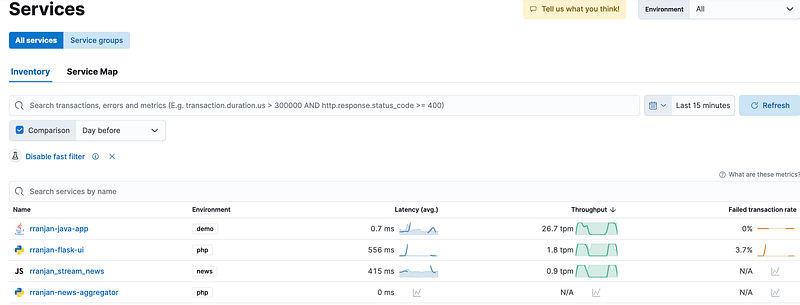
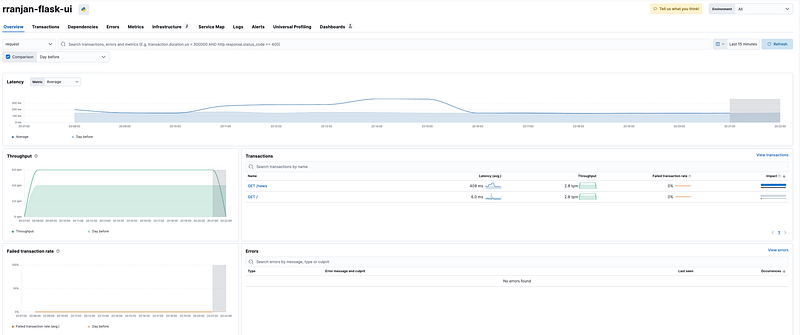
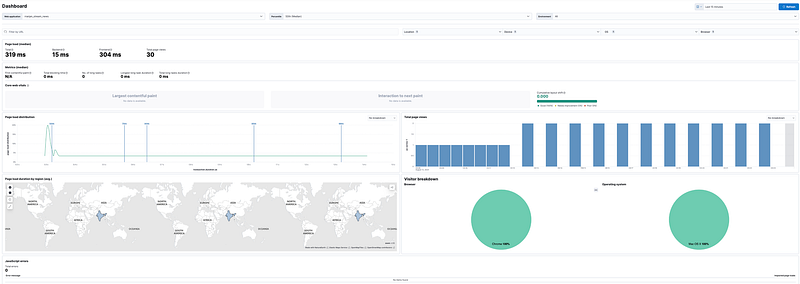
Real User Monitoring(RUM) Dashboard
Launch the Flask UI application to stream the news by logging in to http://127.0.0.1:5001/
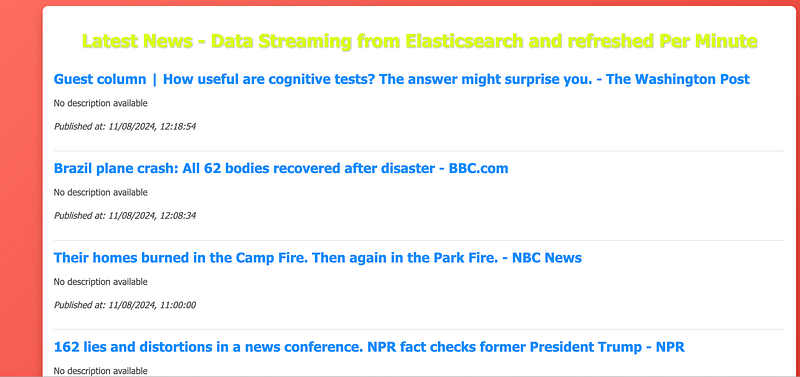
Flask UI Sample with real-time news streaming.
The project code is available at my GitHub repo for download and ready to use by replacing the Elasticsearch, APM credentials.
#Python #Flask #Elasticsearch #ElasticAPM #Docker #WebDevelopment #RealTimeApplications #Monitoring #DevOps
Ref:




Leave a Reply